Author: admin

What happens when you throw an exception in Parallel Loops

Bad things, bad things happen … explosions, tears … and maybe more

        var numbers = new[] {1, 2, 3, 4, 5};
        Parallel.ForEach( numbers, (number) =>
          {
            Console.WriteLine($"Working on number: {number}");
            if (number == 3)
            {
              throw new Exception( "Boom!");
            }
          }

In the example above, the code will explode because of the exception.
So obviously we will add a try catch block…

try
      {
        var numbers = new[] {1, 2, 3, 4, 5};
        Parallel.ForEach( numbers, (number) =>
          {
            Console.WriteLine($"Working on number: {number}");
            if (number == 3)
            {
              throw new Exception( "Boom!");
            }
          }
        );
      }
      catch (Exception e)
      {
        Console.WriteLine( $"Caught exception! {e.Message}");
      }

And that will work, (of course)

But what if we want to run an async function in parallel … then what do we do?

      try
      {
        var numbers = new[] { 1, 2, 3, 4, 5 };
        Parallel.ForEach(numbers, async (number) =>
          {
            
Console.WriteLine($"Working on number: {number}");
            
            if (number == 3)
            {
              throw new Exception("Boom!");
            }
          }
        );
      }
      catch (Exception e)
      {
        Console.WriteLine($"Caught exception! {e.Message}");
      }

In the case above you fire tasks, but don’t really wait for them to complete.
The async and await might give you the feeling that you are doing something truly in parallel … but you are not
Because Parallel.ForEach has no overload accepting a Func<Task>, it accepts only Action delegates.

The easy way out is to use Task as they were intended

try
      {
        // use a concurent queue so all the thread can add
        // while it is an overhead we do not expect to have that many exceptions in production code.
        var exceptions = new ConcurrentQueue<Exception>();
        var numbers = new[] { 1, 2, 3, 4, 5 };
        var tasks = new List<Task>();

        async Task t(int number)
        {
          // protect everything with a try catch
          try
          {
            await Task.Delay(100).ConfigureAwait(false);
            Console.WriteLine($"Working on number: {number}");
            if (number == 3)
            {
              throw new Exception("Boom!");
            }
          }
          catch (Exception e)
          {
            // save it for later.
            exceptions.Enqueue(e);
          }
        }

        foreach (var number in numbers)
        {
          tasks.Add( t(number) );
        }

        Task.WaitAll(tasks.ToArray());
         
        // we are back in our own thread
        if (exceptions.Count > 0)
        {
          throw new AggregateException( exceptions );
        }
      }
      catch (Exception e)
      {
        Console.WriteLine($"Caught exception! {e.Message}");
      }

Now obviously this is ugly code, but you get the idea … run all the tasks in parallel and wait for them all to finish.

Once they are all done, you can throw an aggregation of errors…. if there are any

Have a look at the code on my github page for more information/sample

Git authentification failed with no password prompt

Sometimes when trying to pull/push to a git repo, (on my own server or github), I get something like

fatal: Authentication failed for ‘https://….'”

Authentication failed

Now the problem is that I don’t even get asked for a username and password … sounds a bit stupid if you ask me.

On Windows 10:

  • Press Start, (the windows key)
  • Start typing “Credential Manager” or look for it in the control panel
  • Then select the Windows Credentials
  • Look for whatever website is the one that has your credentials
    Usually something like git:http://...
  • Remove the entry or edit it.
    If you remove it you will be asked for the credentials again.

What is the fastest lock in C#

I often wonder what the fastest lock is in C#.

If course they all have their own pros and cons, but when it comes to raw speed, what is the fastest lock.

We have a couple of options, but the common ones are

  • Lock object
  • Semaphore
  • Mutex
  • Read writer lock
    • Read
    • Write

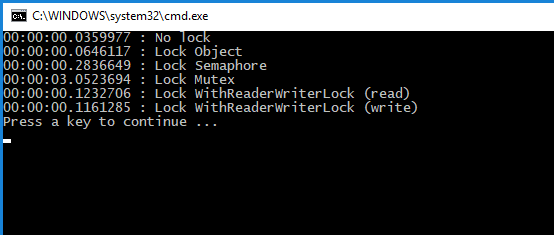
The test was to add 10 million random numbers and test the various locks.

As this is not a multi threaded application, the waiting for the lock is imaterial here, we are only testing getting the lock.

In other words, this is an ideal scenario, you are not waiting for any lock, you are simply getting it.

Raw lock test

Obviously not getting any locks is faster, followed by both the ReaderWriterLockSlim, (read lock and write lock), then the SemaphoreSlim and the Mutex was, by far, the worse of them all.

  • The ReaderWriterLockSlim is slower because extra work is spent looking for re-entry as well as using a SpinLock
  • The SemaphoreSlim is even slower because we do a SpinWait and wait other threads to release the lock, (or locks as we could have more than one).
  • The mutex class is slower still because it puts the thread to sleep until it has access to the handle, and then wakes it up again.

You have a look at the code on my github page.

Navigation