Derived methods are not called in the base destructor as you might expect
C++ Equivalent of SpinWait.SpinUntil
How to spin until, (similar to c# SpinUntil), in a c++ code
Add Google test directly to your Visual Studio project
How to add Google test to a c++ project without using a package.
Parallel.ForEach Async in C#
As mentioned in my previous post, to get a ‘proper’ parallel foreach that is async is a bit of a pain
So the solution is to write a true async function
public static async Task ForEach<T>(ICollection<T> source, Func<T, Task> body, CancellationToken token )
{
  // create the list of tasks we will be running
  var tasks = new List<Task>(source.Count);
  try
  {
    // and add them all at once.
    tasks.AddRange(source.Select(s => Task.Run(() => body(s), token)));

    // execute it all with a delay to throw.
    for (; ; )
    {
      // very short delay
      var delay = Task.Delay(1, token );

      // and all our tasks
      await Task.WhenAny( Task.WhenAll(tasks), delay).ConfigureAwait(false);
      if (tasks.All(t => t.IsCompleted))
      {
        break;
      }

      //
      // ... use a spinner or something
    }
    await Task.WhenAll(tasks.ToArray()).ConfigureAwait(false);

    // throw if we are done here.
    token.ThrowIfCancellationRequested();
  }
  finally
  {
    // find the error(s) that might have happened.
    var errors = tasks.Where(tt => tt.IsFaulted).Select(tu => tu.Exception).ToList();

    // we are back in our own thread
    if (errors.Count > 0)
    {
      throw new AggregateException(errors);
    }
  }
}
And you can call it …
await ParallelAsync.ForEach(number, async (numbers) =>
{
  // blah ...

  // blah ....
  await DoSomethingAmazing( number ).ConfigureAwait(false);
}, CancellationToken.None).ConfigureAwait( false );
Of course, you can refine it by adding check for tokens that cannot be cancelled as well as empty sources
First prize you must make sure that the body of the ForEach takes in the token and cancels cleanly otherwise this will jump out with thread left up in the air… but at least it will get out.
Edit: As someone pointed out to me on StackOverflow there are a couple of subtle ways I can improve my implementation … so I added them here
What happens when you throw an exception in Parallel Loops
Bad things, bad things happen … explosions, tears … and maybe more
        var numbers = new[] {1, 2, 3, 4, 5};
        Parallel.ForEach( numbers, (number) =>
          {
            Console.WriteLine($"Working on number: {number}");
            if (number == 3)
            {
              throw new Exception( "Boom!");
            }
          }
In the example above, the code will explode because of the exception.
So obviously we will add a try catch block…
try
      {
        var numbers = new[] {1, 2, 3, 4, 5};
        Parallel.ForEach( numbers, (number) =>
          {
            Console.WriteLine($"Working on number: {number}");
            if (number == 3)
            {
              throw new Exception( "Boom!");
            }
          }
        );
      }
      catch (Exception e)
      {
        Console.WriteLine( $"Caught exception! {e.Message}");
      }
And that will work, (of course)
But what if we want to run an async function in parallel … then what do we do?
      try
      {
        var numbers = new[] { 1, 2, 3, 4, 5 };
        Parallel.ForEach(numbers, async (number) =>
          {

Console.WriteLine($"Working on number: {number}");

            if (number == 3)
            {
              throw new Exception("Boom!");
            }
          }
        );
      }
      catch (Exception e)
      {
        Console.WriteLine($"Caught exception! {e.Message}");
      }
In the case above you fire tasks, but don’t really wait for them to complete.
The async and await might give you the feeling that you are doing something truly in parallel … but you are not
Because Parallel.ForEach has no overload accepting a Func<Task>, it accepts only Action delegates.
The easy way out is to use Task as they were intended
try
      {
        // use a concurent queue so all the thread can add
        // while it is an overhead we do not expect to have that many exceptions in production code.
        var exceptions = new ConcurrentQueue<Exception>();
        var numbers = new[] { 1, 2, 3, 4, 5 };
        var tasks = new List<Task>();

        async Task t(int number)
        {
          // protect everything with a try catch
          try
          {
            await Task.Delay(100).ConfigureAwait(false);
            Console.WriteLine($"Working on number: {number}");
            if (number == 3)
            {
              throw new Exception("Boom!");
            }
          }
          catch (Exception e)
          {
            // save it for later.
            exceptions.Enqueue(e);
          }
        }

        foreach (var number in numbers)
        {
          tasks.Add( t(number) );
        }

        Task.WaitAll(tasks.ToArray());

        // we are back in our own thread
        if (exceptions.Count > 0)
        {
          throw new AggregateException( exceptions );
        }
      }
      catch (Exception e)
      {
        Console.WriteLine($"Caught exception! {e.Message}");
      }
Now obviously this is ugly code, but you get the idea … run all the tasks in parallel and wait for them all to finish.
Once they are all done, you can throw an aggregation of errors…. if there are any
Have a look at the code on my github page for more information/sample
What is the fastest lock in C#
I often wonder what the fastest lock is in C#.
If course they all have their own pros and cons, but when it comes to raw speed, what is the fastest lock.
We have a couple of options, but the common ones are
- Lock object
- Semaphore
- Mutex
- Read writer lock
- Read
- Write
The test was to add 10 million random numbers and test the various locks.
As this is not a multi threaded application, the waiting for the lock is imaterial here, we are only testing getting the lock.
In other words, this is an ideal scenario, you are not waiting for any lock, you are simply getting it.
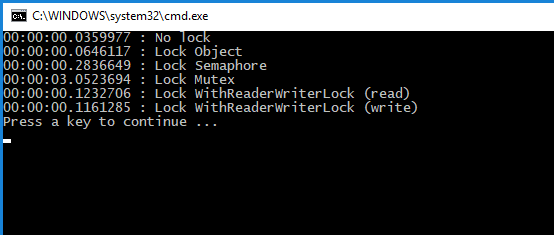
Obviously not getting any locks is faster, followed by both the ReaderWriterLockSlim, (read lock and write lock), then the SemaphoreSlim and the Mutex was, by far, the worse of them all.
- The ReaderWriterLockSlim is slower because extra work is spent looking for re-entry as well as using a SpinLock
- The SemaphoreSlim is even slower because we do a SpinWait and wait other threads to release the lock, (or locks as we could have more than one).
- The mutex class is slower still because it puts the thread to sleep until it has access to the handle, and then wakes it up again.
You have a look at the code on my github page.
How to unit test a config file, (ConfigurationSection)
How to unit test a configuration file in c#, (example with NUnit but works with any test framework like Miscosoft Test)
Powershell cheatsheet for C++/C#
This is my own little cheatsheet for powershell C++ and C#
What I had forgotten about WM_CLOSE
What happens when you call WM_CLOSE and close a window.
Embed Python in your C++ application without Python installed on guest machine
Trying to embed Python in you C++ app when the user does not have Python installed will cause a crash.
This shows you how to ‘force’ the correct version of Python, regardless what the user has installed.